How it works
Names inside Mission Control, on stock macOS
Mission Control is the one place Apple lets nobody in. Here is how Doorplate puts your names there anyway, without touching a system file.
Updated 7 September 2026
The problem
Mission Control is drawn by the Dock. Its row of desktop thumbnails, the “Desktop N” label under each one, and the animation when the row expands all live inside a process no other app can modify. The tools that used to rename desktops there, Spaces Renamer and TotalSpaces2, worked by injecting code into the Dock, which needs System Integrity Protection turned off and does not run on Apple Silicon at all.
What Doorplate does instead
- Notice that Mission Control opened. A sub-millisecond read of the window list, made only after recent input, because Mission Control never opens without it.
- Ask the Dock where its labels are. With Accessibility granted, the Dock describes its Mission Control row through the same tree screen readers use: each thumbnail, its label, its position and size. Doorplate reads that in one batched call per thumbnail.
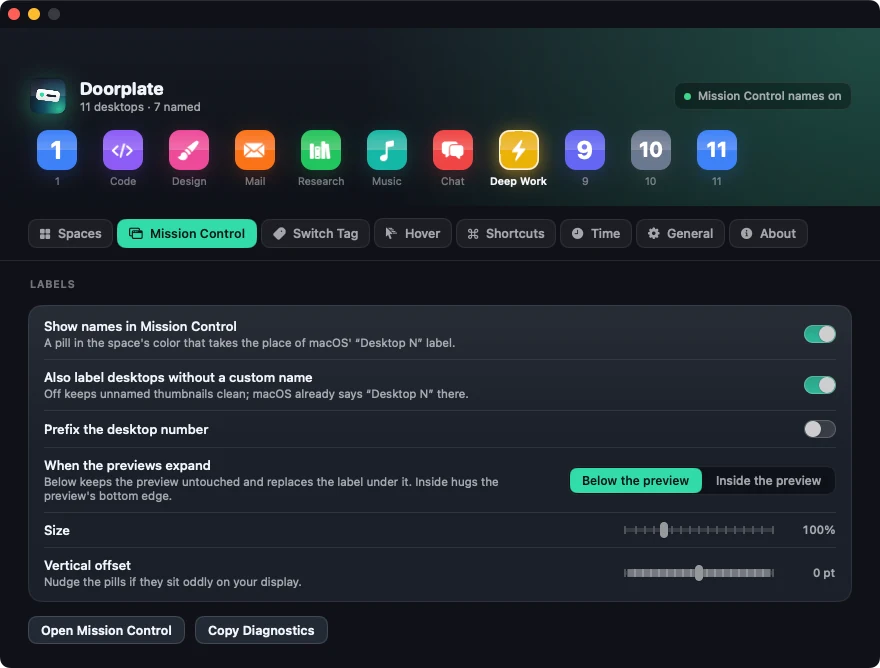
- Lay a pill over each label. A small panel in the desktop’s color, with the name, exactly where “Desktop N” is. On the collapsed row it covers the label; when the previews expand it sits on the label line under each preview, so the preview stays untouched. Settings can move it inside the preview’s bottom edge instead.
- Move with the Dock. The Dock announces when the row expands and when Mission Control closes. The pills slide in with the bar, glide down as the previews grow, and ride out with the bar when it leaves. A listen-only tap for the two mouse-button events lets the click that closes Mission Control send the pills away at the same instant as the bar.

Nothing is injected and nothing is patched. The Dock does not know Doorplate exists; it is just being read, the way it is read by VoiceOver.
What it costs
Nothing until Mission Control opens. While it is open, reading the row costs about 3 % of one core, with bursts to 9 % for the half second after the row expands. Label positions are read fast for a moment after the Dock reports the pointer reaching the row (that is what precedes the row expanding) and ten times a second otherwise. The moment Mission Control closes, the reads stop.
Your options
- Placement: on the label line below each preview, or inside the preview’s bottom edge.
- Unnamed desktops: give them a pill too, or leave macOS’ own “Desktop N” showing.
- Number prefix: “3 · Code” if you switch by number.
- Size and offset: a nudge for displays that draw the row differently.
Limits, stated plainly
- Fullscreen and Split View spaces show the app’s name in Mission Control and cannot be relabelled by any app.
- The pills depend on the Dock’s Accessibility tree. Doorplate is verified on each macOS release before it ships; if a beta changes the tree, the pills are the one feature that could need an update.
- Accessibility must be granted. Without it Doorplate still names desktops in the menu bar, the Quick Switcher, the hover strip and the switch tag; only the pills wait.
Everything else is in the FAQ, and the whole app is described on the front page.
People also ask
Does this work on Apple Silicon?
Yes. The Dock’s Accessibility tree is the same on Apple Silicon and Intel, and Doorplate ships as a universal binary.
Do I have to turn off System Integrity Protection?
No. Doorplate never modifies the Dock or any system file. Only the older injection-based tools, Spaces Renamer and TotalSpaces2, need SIP off, and neither runs on Apple Silicon without it.
Does it work with several displays?
Yes. Each display’s row is read separately and gets its own pills.
What happens on a new macOS version?
The pills depend on where the Dock reports its labels. Every macOS release is checked before it ships; if a beta moves the labels, an update follows. The switching, the menu bar and everything else do not depend on the Dock’s tree at all.
Version 1.6.2 · 4.0 MB · macOS 14 Sonoma or later · Apple Silicon and Intel